10 Best OBD2 Apps Like Dr. Prius in 2026

Dr. Prius earned its reputation by giving Prius and hybrid owners a window into battery cell voltages, hybrid system data, and diagnostic codes that generic scanners never touch. That kind of vehicle-specific insight is exactly what makes an OBD2 tool worth owning instead of borrowing one from a friend. The right scanner turns a phone into a diagnostic screen, showing you what’s happening under the hood in real time rather than waiting for a warning light to force a shop visit.
Not every scanner delivers that depth, though. Some tools are built purely for reading and clearing check-engine codes on any 1996-and-newer vehicle, while others unlock ABS, SRS, TPMS, and manufacturer-specific systems the way Dr. Prius does for Toyota hybrids. The setup that matters most is the pairing of hardware and app: a Bluetooth adapter is only as capable as the software it talks to, and compatibility varies sharply between iPhone, Android, and Windows. Coverage for coding, bidirectional control, and battery-specific data also splits scanners into very different price and skill tiers.
Picking the right one means matching your vehicle, platform, and diagnostic ambitions to a scanner built for that job. A basic code reader suffices for a used-car pre-purchase check, but hybrid owners chasing battery health or BMW owners wanting coding access need something built for that specific task.
Best overall Dr. Prius alternative: BlueDriver OBD2 Scanner
Best for third-party app flexibility: OBDLink MX+
Best budget iOS-compatible scanner: Veepeak OBDCheck BLE
Best for CAN-bus coding projects: Vgate vLinker MC+
Best for BMW and Mini owners: OBDLink CX
Best for beginner-friendly repair guidance: FIXD Bluetooth Scanner
Best cheap Android-only option: Veepeak Mini Bluetooth Scanner
Best standalone reader with no app required: ANCEL AD310
Best for bidirectional control and coding: Thinkdiag2
Best handheld for smog check prep: ANCEL AD410
BlueDriver OBD2 Scanner

Buy this if you want the closest thing to a shop-grade scan tool without paying a subscription fee, ever.
Pros
- No subscription, all features unlocked at purchase
- Reads ABS, SRS, TPMS, and transmission codes beyond generic engine data
- VIN-matched repair reports built from real technician fixes
Cons
- No dedicated hybrid battery-cell view like Dr. Prius
- Gas vehicles only, no diesel support
- iOS and Android only, no Windows app
The BlueDriver Pro connects over Bluetooth to a small OBDII adapter and pairs with a free app that covers far more than check-engine codes. It pulls ABS, SRS, and TPMS data along with live parameters, freeze frames, and Mode 6 test results, which puts it well ahead of basic code readers.
Repair reports tied to your specific VIN are a standout feature, cutting down the guesswork that usually comes with a raw trouble code. It doesn’t dig into hybrid battery cell voltages the way Dr. Prius does for Toyota hybrids, but for gas-powered daily drivers and used-car inspections, it’s one of the most complete tools on this list.
OBDLink MX+

Buy this if you want a single adapter that works reliably with a wide range of third-party diagnostic apps, including hybrid-focused ones.
Pros
- Works with FORScan, Torque, Carista, AlfaOBD, and other specialized apps
- Enhanced OEM support for Ford, GM, Toyota/Lexus, Honda, and more
- Overvoltage and battery-drain protection for permanent installs
Cons
- No proprietary Dr. Prius-style hybrid app included
- Setup requires picking the right companion app for your goals
- Premium price for what is essentially a Bluetooth adapter
The OBDLink MX+ isn’t an app itself, it’s the hardware backbone that many hybrid and EV-focused apps rely on for a stable connection. That distinction matters: pair it with a hybrid diagnostic app and you get the kind of cell-level insight Prius owners expect.
Its enhanced OEM protocol support means it can pull ABS, SRS, and TPMS data on many makes without needing a dealer tool. The tradeoff is a little research up front to confirm which app unlocks the features you’re after.
Veepeak OBDCheck BLE

Buy this if you want an affordable Bluetooth LE adapter that actually works with iPhones, unlike most budget scanners.
Pros
- True Bluetooth LE support for both iOS and Android
- Compatible with Car Scanner, Torque, OBD Fusion, and BimmerLink
- Small, pocketable design for glovebox storage
Cons
- No built-in ABS/SRS support without a compatible app
- Special functions like EPB reset and injector coding aren’t supported
- Requires downloading and configuring a third-party app correctly
This adapter is a solid entry point for drivers who just want live data and code reading without committing to a proprietary ecosystem. It leans entirely on the app you pair it with, so a hybrid-specific app can extend its usefulness toward Dr. Prius-style monitoring.
The catch is that advanced diagnostics depend on which app you choose, and Veepeak is upfront that some manufacturer-specific functions simply aren’t available through this adapter. For straightforward engine diagnostics on a budget, it delivers.
Vgate vLinker MC+

Buy this if you’re doing coding work on GM or Ford vehicles and need MS-CAN and SW-CAN protocol access.
Pros
- Supports proprietary GM and Ford networks beyond standard OBD2 protocols
- Low-power sleep mode protects against battery drain when left plugged in
- Compatible with FORScan, JScan, and other coding-focused apps
Cons
- iOS support is a newer addition and less proven than Android
- Not built for hybrid battery diagnostics
- Requires third-party coding software, which adds a learning curve
Vgate built this adapter for DIY coding projects, not casual code reading. Owners running FORScan on a Ford or JScan on a Jeep get the module-level access that basic scanners can’t touch, thanks to MS-CAN and SW-CAN protocol support.
It’s compact and sips very little power, so leaving it plugged in doesn’t risk draining your battery. Just know this tool is aimed at coding enthusiasts, not drivers looking for Dr. Prius-style hybrid monitoring.
OBDLink CX

Buy this if you own a BMW or Mini and want reliable coding access through BimmerCode without connection dropouts.
Pros
- Built specifically for BimmerCode compatibility with full feature coverage
- Bluetooth 5.1 connection stays stable during coding sessions
- Includes a general OBDLink app for live data and code clearing
Cons
- BimmerCode itself is sold separately
- Limited value outside BMW/Mini platforms
- Older BMW chassis codes (like E46) may have partial support
Coding a BMW’s hidden features, like drive modes or battery registration, requires a rock-solid Bluetooth connection, and that’s exactly what the OBDLink CX is engineered for. A dropped packet mid-code can cause real problems, and this adapter is built to avoid that.
It doubles as a general-purpose OBD2 scanner through the included OBDLink app, covering check-engine codes and live parameters. For BMW and Mini owners specifically, it’s a purpose-built tool worth the extra cost over a generic adapter.
FIXD Bluetooth Scanner
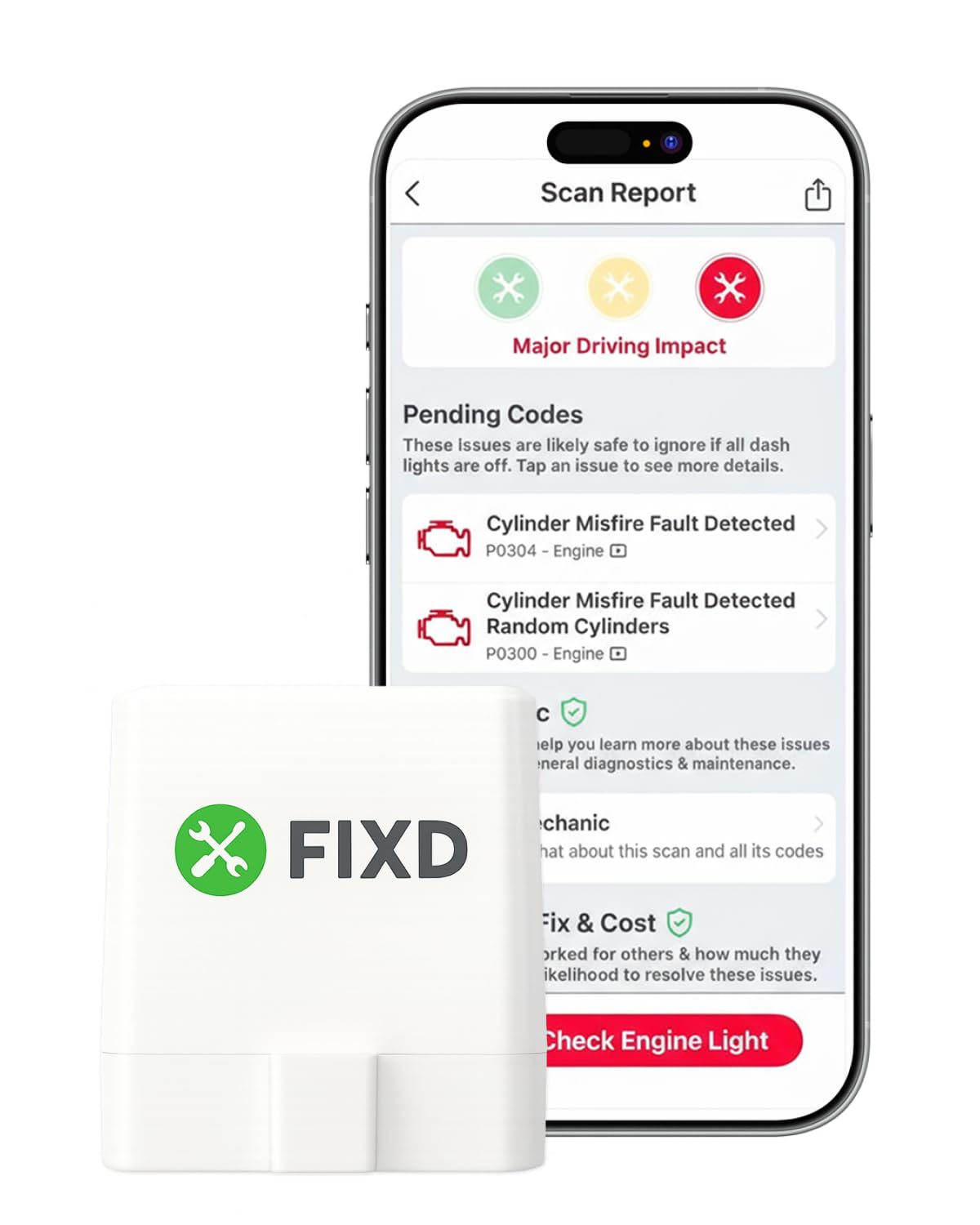
Buy this if you want plain-English explanations of check-engine codes without decoding technical jargon yourself.
Pros
- Translates trouble codes into simple, non-technical explanations
- Free app covers unlimited basic scans across multiple vehicles
- Alerts for severe issues help prioritize what needs attention now
Cons
- Best features sit behind an optional premium subscription
- No ABS, SRS, or hybrid battery diagnostics
- Some users report codes persisting after a fix is completed
FIXD targets drivers who don’t want to research what a P0420 code means at 9 p.m. on a Tuesday. The app converts codes into readable explanations and flags urgent problems, which is genuinely useful for non-mechanics.
The free tier covers the basics, but repair cost estimates and live mechanic support require a premium trial or subscription. That’s a meaningful difference from BlueDriver’s one-time purchase model, so budget-conscious buyers should factor that in before choosing FIXD as their primary tool.
Veepeak Mini Bluetooth Scanner

Buy this if you’re on Android only and want the cheapest reliable way to read live engine data alongside Torque or Car Scanner.
Pros
- Classic Bluetooth pairing works smoothly with Android phones
- Compatible with popular free and paid diagnostic apps
- Compact size doesn’t stick out awkwardly from the OBD port
Cons
- No iPhone support whatsoever
- No ABS, SRS, or TPMS diagnostics
- Some users report connection issues after years of daily use
This is a no-frills adapter for Android users who already know which app they want to run. It works well with Torque Pro for live data logging, especially for drivers tracking transmission temperature or fuel trim during towing.
There’s no case included, which is a small but real annoyance for something meant to travel between vehicles. For iPhone households, this one’s a non-starter, but Android-only garages will find it a dependable, inexpensive option.
ANCEL AD310

Buy this if you want a standalone handheld reader with no app, no Bluetooth pairing, and no phone required.
Pros
- Plugs directly into the OBD port with its own screen and buttons
- No app, subscription, or phone battery dependency
- Well-suited for quick pre-purchase used-car inspections
Cons
- Emission-related codes only, no ABS or SRS
- No live hybrid battery data
- Small screen compared to a smartphone display
The AD310 skips the smartphone entirely, which some drivers prefer for simplicity and reliability. Plug it in, read the code, look up the definition, done, no Bluetooth pairing hiccups involved.
It’s a favorite for quick used-car checks at a dealer lot, since it works instantly without downloading anything. The tradeoff is depth: this reader sticks to emissions-related codes and won’t touch ABS, SRS, or hybrid systems.
Thinkdiag2

Buy this if you want bidirectional control and full-system diagnostics that rival shop-level tools, provided you accept the update fee.
Pros
- Bidirectional control for active tests like cycling A/C clutches or windows
- Full-system diagnosis covering ECM, ABS, SRS, TCM, TPMS, and more
- 15+ reset functions including oil, EPB, and ABS bleeding
Cons
- Requires a paid annual update after the first year
- Not all vehicles support every special function
- Steeper learning curve than a basic code reader
Thinkdiag2 pushes into territory usually reserved for dealer-level tools, sending commands to test components directly rather than just reading sensor output. That’s a meaningful step up for DIYers tackling ABS bleeding or key fob programming.
The catch is the subscription-style update model after year one, which runs contrary to the no-subscription approach some competitors take. For serious home mechanics comfortable with that tradeoff, the capability here is hard to match at this price.
ANCEL AD410

Buy this if you need a dedicated handheld for smog check prep and want a bigger screen than the AD310 offers.
Pros
- Large 2.4-inch color display makes codes and live data easy to read
- I/M readiness check helps avoid failed emissions inspections
- No app, Bluetooth, or subscription needed
Cons
- Engine and emissions codes only, no ABS, SRS, or bidirectional control
- Manual has notably small print according to owners
- No hybrid-specific data of any kind
The AD410 builds on the AD310’s plug-and-play simplicity with a larger, clearer screen and a stronger focus on smog readiness checks. Checking I/M readiness before an emissions test can save a wasted trip and a retest fee.
It handles live data streams like RPM and coolant temperature reasonably well for a screen-based reader. Drivers wanting ABS or SRS access, or anything hybrid-related, need to look elsewhere on this list.
Buying Guide
Match the Adapter to Your Phone
iPhone, Android, and Windows compatibility varies more than most buyers expect. Some adapters use Bluetooth Classic, which iPhones can’t pair with directly, while Bluetooth LE adapters work across both major platforms.
Check the specific wireless protocol before buying, not just the “Bluetooth” label on the box. An adapter listed as Android-only will not connect to an iPhone no matter which app you download.
Diagnostic Depth Beyond Check-Engine Codes
Basic code readers handle emissions-related trouble codes and little else. Enhanced diagnostics covering ABS, SRS, TPMS, and transmission systems require adapters and apps specifically built to access those modules.
| Diagnostic Level | What It Covers | Best For |
|---|---|---|
| Basic | Check-engine codes, I/M readiness | Used-car checks, smog prep |
| Enhanced | ABS, SRS, TPMS, live data | DIY troubleshooting |
| Bidirectional | Active tests, resets, coding | Advanced repairs, coding projects |
Subscription Models Vary Widely
Some tools charge nothing after the initial purchase, while others require annual fees to keep code databases or app features current. Read the fine print on update costs before assuming a low upfront price is the full cost.
Hybrid and EV-Specific Data
General OBD2 scanners read standardized engine codes but rarely expose hybrid battery cell voltages or EV-specific parameters. Look for apps designed around your specific hybrid or EV platform if that battery-level insight is the goal, since the hardware adapter alone won’t provide it.
Vehicle Coverage and Protocols
Confirm your vehicle’s model year and protocol support (CAN, KWP2000, ISO9141, or CAN-FD for newer GM vehicles) before purchasing. Coverage gaps are more common on older vehicles or less mainstream brands.
Editor’s Choice
The BlueDriver OBD2 Scanner earns the top spot for most drivers who want Dr. Prius-level diagnostic depth without hybrid-only limitations. It reads ABS, SRS, TPMS, and transmission codes, delivers VIN-matched repair reports, and never asks for a subscription.
For BMW and Mini owners specifically, the OBDLink CX is the more targeted choice, since its Bluetooth 5.1 connection and BimmerCode compatibility solve problems generic adapters can’t. DIY mechanics chasing bidirectional control and active tests should look at the Thinkdiag2, accepting its update fee as the cost of dealer-level access.
Hybrid and EV owners hunting for true Dr. Prius-style battery insight will need to pair a versatile adapter like the OBDLink MX+ with a hybrid-specific app, since no single scanner here replicates that dedicated experience out of the box.
Conclusion
Choosing a Dr. Prius alternative comes down to matching the adapter, app, and diagnostic depth to what you actually plan to fix. A used-car buyer needs a fraction of the capability a BMW coder or hybrid battery enthusiast requires.
Start with your phone’s operating system, confirm the adapter’s Bluetooth type, then work backward from the diagnostics you need, whether that’s a simple check-engine code or full bidirectional control. Getting that match right the first time saves both money and the frustration of a scanner that won’t pair with your setup.
FAQS
Does any scanner on this list replicate Dr. Prius exactly? None offer the same dedicated hybrid battery cell-voltage monitoring built specifically for Toyota hybrids. Pairing a flexible adapter like the OBDLink MX+ with a hybrid-focused app gets closest to that experience.
Can I use one of these scanners on both my Toyota Prius and a friend’s BMW? Cross-platform adapters like the BlueDriver, OBDLink MX+, and Vgate vLinker MC+ work across many makes, though feature depth varies by manufacturer. BMW-specific coding still works best with a purpose-built tool like the OBDLink CX.
Do I need a subscription for these scanners to keep working? Not always. BlueDriver and the ANCEL readers charge once with no recurring fees, while FIXD’s advanced features and Thinkdiag2’s post-year-one updates involve additional costs.
Which scanner works best for a quick used-car inspection? A standalone reader like the ANCEL AD310 gets the job done fastest, since it needs no app or pairing step. For a deeper pre-purchase check including ABS and SRS, the BlueDriver adds meaningfully more information.
Is Bluetooth LE the same as Bluetooth Classic for OBD2 adapters? No, and this trips up a lot of buyers. iPhones require Bluetooth LE adapters, while some Android-only scanners rely on Bluetooth Classic, so always confirm which type your chosen adapter uses.
