10 BimmerLink Compatible OBD2 Adapters: 2026 Buying Guide

BimmerLink reads live data, pulls fault codes, and runs service resets on BMW and MINI models, but it only works as well as the adapter feeding it data. Not every OBD2 dongle handles the proprietary BMW protocols BimmerLink relies on, and plenty of listings that mention “BMW” or “BimmerCode” don’t actually confirm BimmerLink support. Picking the wrong one means dropped connections mid-scan or missing modules entirely.
BMW and MINI diagnostics run over different networks than a typical Ford or Toyota, which is why generic Bluetooth scanners sometimes stall on advanced functions like battery registration or individual control unit scans. A BimmerLink compatible OBD2 adapter needs stable Bluetooth Low Energy (BLE) or a wired connection that can keep pace with BMW’s CAN bus without dropping packets, especially during longer coding or reset sequences.
Setup friction matters too. Some adapters pair instantly inside the app; others require manual Bluetooth pairing, PIN entry, or driver installation on a laptop. We looked at ten adapters spanning BLE dongles, USB tools, and one ENET cable to sort out which ones fit BimmerLink use cases without guesswork.
Best for plug-and-play BimmerLink use: OBDLink CX
Best budget BLE option: Veepeak OBDCheck BLE
Best for stronger BLE range: Veepeak OBDCheck BLE+
Best for G-Series coding support: Vgate vLinker BM Plus
Best general-purpose BLE scanner: Vgate iCar Pro
Best for advanced live data monitoring: OBDLink MX+
Best for deep F/G-Series coding via laptop: OHP ENET Cable
Best for Ford/Mazda owners who also drive a BMW: VGATE vLinker FS USB
Best compact backup adapter: iCar2 BLE 4.0
Best newer BLE adapter for EV/hybrid BMWs: Vgate iCar Pro 2S
OBDLink CX

This is the adapter to buy if BimmerLink reliability matters more than saving a few dollars.
Pros
- Built for BimmerCode’s protocol requirements, which overlaps heavily with BimmerLink’s data needs
- Bluetooth 5.1 holds a stable connection during longer coding sessions
- Overvoltage protection and sleep mode allow it to stay plugged in permanently
Cons
- Priced higher than basic BLE dongles
- BimmerCode app sold separately, and BimmerLink support isn’t explicitly listed
- Overkill for owners who only want occasional fault-code checks
OBDLink built this adapter around BimmerCode’s specific hardware demands, and that same rock-solid BLE connection tends to carry over well to BimmerLink sessions, since both apps lean on similar BMW-specific PIDs and modules. Reviewers report smooth battery registrations and stable pairing across BMW generations, including older E-chassis cars.
The listing doesn’t name BimmerLink directly, so treat this as a strong likely fit based on protocol overlap rather than a confirmed claim. For owners who want an adapter that can stay in the OBD port full-time without draining the battery, the sleep mode and overvoltage protection are worth the premium.
Veepeak OBDCheck BLE

A solid low-cost entry point for reading and clearing generic fault codes, with BMW-specific coding support that’s limited by model year.
Pros
- Inexpensive BLE adapter with dependable pairing on iOS and Android
- Listed compatibility with BimmerCode and BimmerLink for many models
- Small enough to leave connected without blocking other OBD port access
Cons
- BimmerCode/BimmerLink support excludes model years before 2008
- G and U series BMWs are not supported
- Advanced functions like coding and resets depend heavily on which app tier is used
Veepeak’s listing explicitly names BimmerLink as a compatible app, which sets it apart from adapters that only mention BimmerCode. The catch is the same limitation quoted across their lineup: pre-2008 models and G/U series BMWs are locked out of BimmerLink’s deeper functions. For a 3 Series or 5 Series built after 2008, this is a low-risk way to test the waters.
Standard OBD-II diagnostics work fine regardless of model year. Owners of newer G-chassis cars should look elsewhere for coding-specific tasks.
Veepeak OBDCheck BLE+

This adapter is the step-up version of Veepeak’s BLE dongle, with the same BMW/MINI restrictions but a sturdier build.
Pros
- Same confirmed BimmerCode/BimmerLink compatibility as the standard BLE model
- Slightly larger housing that some owners find easier to grip
- Comes with a carrying case for glovebox storage
Cons
- Still excludes G/U series BMWs and pre-2008 models for BMW-specific apps
- No meaningful functional upgrade over the base BLE model for BimmerLink users
- Marginally higher price for largely the same capability
Reviewers mention using this with BimmerCode and BimmerLink on various BMWs and MINIs, echoing the base BLE model’s app support. The “Plus” naming suggests an upgrade, but the core BimmerLink experience doesn’t change much between the two Veepeak options. Owners choosing between them should base the decision on price rather than expecting extra BMW-specific features.
It fits owners who want a spare adapter or a slightly more substantial housing than the standard BLE version.
Vgate vLinker BM Plus

Built specifically for BMW and MINI coding, this adapter targets G-Series compatibility that many competitors skip.
Pros
- Supports E, F, G, I, and R series BMWs through BimmerCode, including newer G-chassis models
- BimmerLink listed as compatible for battery registration and module-level diagnostics
- Automatic sleep mode with back-feeding protection for long-term use
Cons
- Setup instructions get confusing, and some buyers report difficulty pairing correctly
- Android users must select “vLinker BM” rather than “vLinker BM+” in Bluetooth settings, an easy step to miss
- iOS BimmerCode lacks E/R series support even though the hardware does
Vgate markets this specifically around BMW-specific hardware requirements, and the feature list calls out BimmerLink support for battery registration, exhaust flap control, and fault-code reading across control units. That’s a meaningfully broader claim than most Bluetooth-only competitors make.
The tradeoff is setup complexity. A few reviewers describe confusing instructions and connectivity hiccups, so budget time for initial pairing, particularly on Android devices where device naming matters.
Vgate iCar Pro

A general-purpose BLE 4.0 scanner that works across many vehicle brands, with BMW support depending entirely on the paired app.
Pros
- Broad third-party app support, including OBD Fusion, JScan, and Dr. Prius
- Low power draw with auto-sleep to protect the car battery
- Competitively priced compared to BMW-specific adapters
Cons
- Listing doesn’t mention BimmerLink or BimmerCode directly
- No confirmed G-Series or advanced coding support
- Bluetooth 4.0 is older than what newer competitors offer
This adapter reads as a solid all-purpose OBD-II tool rather than a BMW-specific pick. Reviewers mention pairing it with BMW-adjacent apps like Carista, but the official feature list stops at generic diagnostics and doesn’t confirm BimmerLink compatibility.
For owners who split time between a BMW and another daily driver, this fills the general diagnostics role well. It’s not the adapter to reach for if BimmerLink coding or resets are the primary goal.
OBDLink MX+

A professional-grade scanner with deep live-data capability, recommended for BimmerCode but not explicitly confirmed for BimmerLink.
Pros
- Enhanced OEM-level data streams for ABS, SRS, and TPMS beyond generic OBD-II
- Recommended adapter for FORScan, Carista, and BimmerCode among others
- Firmware updates included, with strong overvoltage and battery-drain protection
Cons
- BimmerLink isn’t named specifically in the compatibility list
- Higher price than most BLE-only competitors
- Extra live-data features may go unused by owners focused only on fault codes and resets
Reviewers use this successfully with BimmerCode and other manufacturer-specific apps, and the enhanced OEM support suggests it can handle BimmerLink’s data requests without issue. Treat that as a reasonable expectation rather than a guarantee, since BimmerLink isn’t named on the spec sheet.
Owners who want one adapter that also works well with Ford, GM, or Toyota vehicles get more mileage from this than from a BMW-only dongle.
OHP ENET Cable

This wired cable serves laptop-based coding tools like ISTA and E-SYS, not phone apps like BimmerLink.
Pros
- Stable, interference-free Ethernet connection for deep coding work
- Supports F, G, and I series BMWs with professional software
- Two-year warranty and shielded CAT5e construction
Cons
- Requires a Windows laptop; Mac needs a virtual machine
- Not built for BimmerLink, which runs on phones over Bluetooth
- No use case for E-Series BMWs, which need a K+DCAN cable instead
This cable belongs in a different category from every Bluetooth adapter on this list. It connects a laptop directly to the OBD port for ISTA+, E-SYS, and Bootmod3 work, tasks that go well beyond what BimmerLink handles on a phone.
Owners doing serious module-level coding on F or G-Series BMWs will want this alongside a BLE adapter, not instead of one. BimmerLink users specifically don’t need it.
VGATE vLinker FS USB
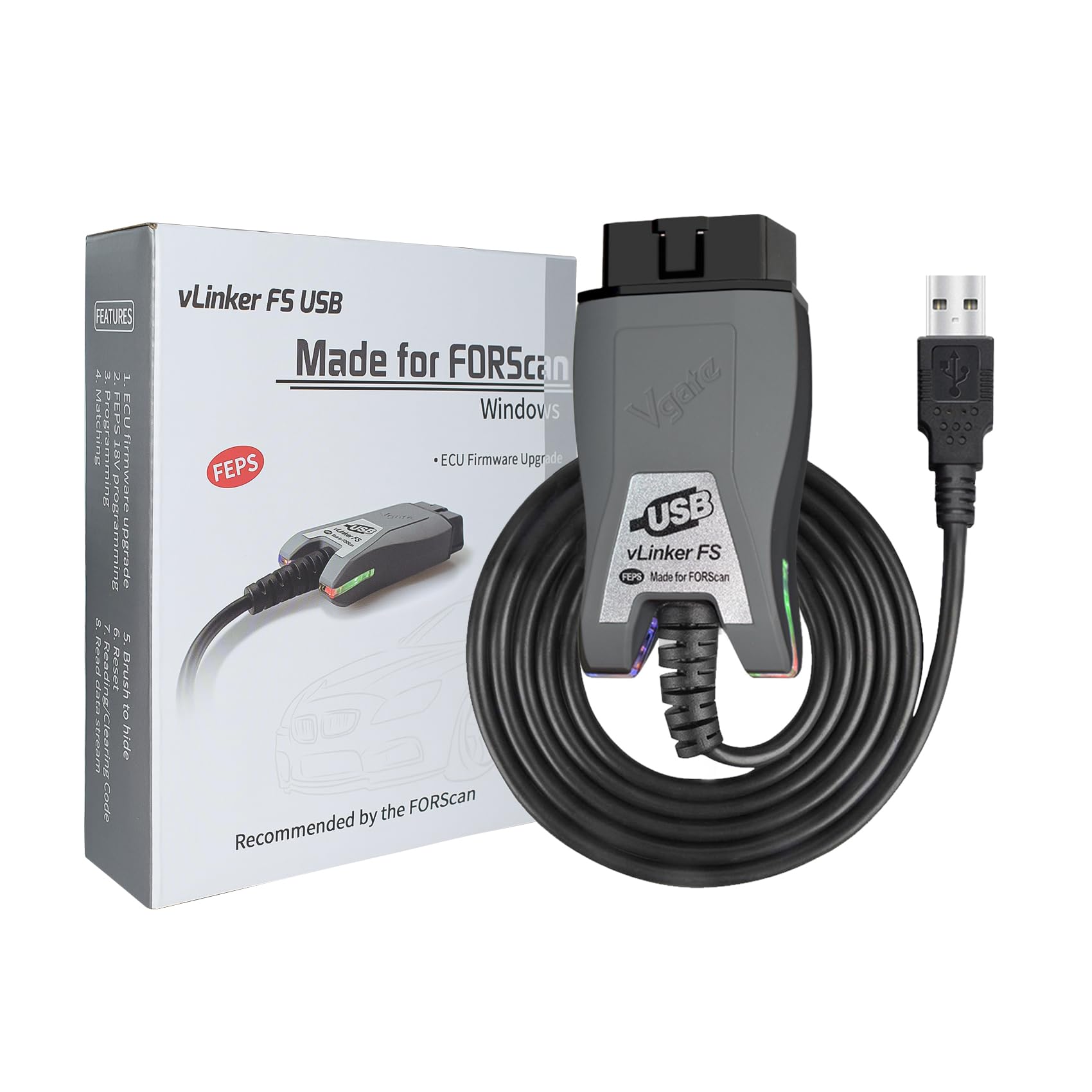
Built for FORScan and Ford-family vehicles, this USB adapter has no listed BMW or BimmerLink support.
Pros
- Fast, stable USB connection with no Bluetooth dropouts
- Automatic switching between HS-CAN and MS-CAN networks
- Strong protection features for long-term plugged-in use
Cons
- Designed for Ford, Lincoln, Mazda, and Mercury vehicles, not BMW
- Requires a Windows PC rather than a phone
- No mention of BimmerLink, BimmerCode, or BMW compatibility anywhere in the listing
This adapter is included here because Ford and BMW ownership overlap in real households, and the FORScan-specific engineering shows what a purpose-built adapter looks like. It has no relevance to BimmerLink use.
Owners who need FORScan for a Ford and a separate tool for a BMW should treat this as a Ford-only purchase and pick a BLE adapter for the BimmerLink side.
iCar2 BLE 4.0

A compact, budget BLE adapter aimed at general diagnostics rather than BMW-specific coding.
Pros
- Small footprint that tucks neatly near the OBD port
- Compatible with common third-party apps like Car Scanner and OBD JScan
- Auto-sleep mode protects the car battery during long-term use
Cons
- No BimmerLink, BimmerCode, or BMW-specific mention in the listing
- Some reviewers report the adapter failing after a few months of use
- Requires manually pressing a power button in some cases, unlike true plug-and-play designs
This adapter reads as a general-purpose backup tool rather than a BMW-focused pick. Reviews mention pairing it with JScan and Car Scanner for various vehicles, but nothing points to BimmerLink support specifically.
It works as a low-cost spare for basic fault-code reading. BMW owners chasing BimmerLink-specific functions should look at the Veepeak or Vgate BMW-focused options instead.
Vgate iCar Pro 2S

An updated Bluetooth 5.2 scanner with BimmerCode named among supported apps, though BimmerLink isn’t specifically confirmed.
Pros
- Faster Bluetooth 5.2 connection with data transfer up to 3Mbps
- Auto-sleep and remote wake-up supported even on EVs and hybrids
- Listed compatibility includes BimmerCode alongside Torque and Car Scanner
Cons
- BimmerLink isn’t named specifically, unlike Veepeak’s BLE models
- Newer Bluetooth version doesn’t guarantee better BMW-specific app performance
- A few reviewers report connection drops on certain vehicle models
Bluetooth 5.2 brings faster data transfer than the standard iCar Pro, and reviewers confirm smooth pairing across several non-BMW vehicles. The listing calls out BimmerCode as a compatible app, but stops short of naming BimmerLink, so treat this as a probable fit rather than a confirmed one.
Owners of EVs or hybrid BMWs may appreciate the remote wake-up feature more than the average gas-powered 3 Series driver.
Buying Guide
Connection Type: BLE, USB, or ENET
BimmerLink runs on a phone, which means it needs a Bluetooth adapter, not a USB or Ethernet cable. Bluetooth Low Energy (BLE) is the standard connection type for this use case, since it pairs directly inside the app without going through the phone’s general Bluetooth settings.
USB adapters and ENET cables serve laptop-based coding software like ISTA, E-SYS, or FORScan. They’re not interchangeable with phone-based BimmerLink workflows, even when the hardware comes from the same manufacturer.
Confirmed App Support vs. Assumed Compatibility
Check whether BimmerLink appears by name in the product listing, not just BimmerCode or generic OBD2 phrasing. Many adapters share hardware between BimmerCode and BimmerLink, but the two apps have separate compatibility lists, and one supporting the other isn’t guaranteed.
| Signal | What It Means |
|---|---|
| BimmerLink named directly | Strongest indicator of support |
| BimmerCode named, BimmerLink absent | Likely compatible, not confirmed |
| Generic OBD2 apps only | Basic fault codes work; BMW-specific functions unlikely |
Model Year and Chassis Coverage
BMW’s onboard networks changed across generations, and several adapters explicitly exclude pre-2008 models or G/U series chassis for BimmerLink’s advanced functions. Confirm the exact chassis code (E90, F30, G20, etc.) against the adapter’s stated coverage before buying.
Setup Friction
Some adapters pair automatically inside the app on both iOS and Android. Others require manual Bluetooth pairing with a PIN, or in the case of Android, selecting the correct device name from a list that shows multiple similar options. Fewer manual steps means fewer chances to connect to the wrong device.
Power Management
Look for auto-sleep and overvoltage protection if the adapter will stay plugged in permanently. A dongle without sleep mode can draw current continuously and drain the battery on a car that sits for days between drives.
Editor’s Choice
The OBDLink CX stands out as the strongest overall pick for BimmerLink users who want dependable BLE performance without fighting setup issues. Its Bluetooth 5.1 connection and battery-safe sleep mode make it a practical adapter to leave in the OBD port permanently, and the protocol overlap with BimmerCode translates well to BimmerLink’s data requests.
For BMW owners on a tighter budget, the Veepeak OBDCheck BLE is the most straightforward alternative. It’s the only adapter in this lineup with BimmerLink named directly in its compatibility list, provided the vehicle is a 2008-or-later model outside the G/U series.
Owners of G-Series BMWs who need coding functions beyond basic fault-code reading should look at the Vgate vLinker BM Plus, which explicitly supports newer chassis codes that many competitors leave out.
Conclusion
Matching an adapter to BimmerLink comes down to three questions: does the listing name BimmerLink or only BimmerCode, does the chassis year fall within the adapter’s stated coverage, and does the connection type match the phone-based workflow BimmerLink requires. Skipping any of those checks risks buying hardware built for a laptop tool or a different BMW app entirely.
The OBDLink CX and Veepeak BLE models cover most BimmerLink use cases without complication. Owners doing deeper module coding on newer BMWs should pair a BLE adapter for day-to-day BimmerLink use with an ENET cable for the occasional laptop-based coding session, since the two tools serve different jobs rather than competing for the same one.
FAQS
Does every BMW-compatible OBD2 adapter work with BimmerLink? No. Many listings mention BimmerCode, generic OBD2 diagnostics, or FORScan without confirming BimmerLink support. Check the specific app compatibility list before buying.
Can I use an ENET cable with BimmerLink? BimmerLink runs on a phone over Bluetooth, so ENET cables built for laptop software like ISTA or E-SYS don’t apply to this use case.
Do older BMWs work with BimmerLink adapters? Some adapters exclude pre-2008 models for BimmerLink’s advanced functions, even though they support standard OBD-II diagnostics on any 1996-or-later vehicle. Confirm the model year restriction before purchasing.
Does a newer Bluetooth version guarantee better BimmerLink performance? Not automatically. Bluetooth 5.1 or 5.2 can offer faster data transfer, but stable pairing and correct protocol support matter more than the Bluetooth version number alone.
Is BimmerLink compatible with G-Series BMWs? It depends on the adapter. Several budget BLE dongles exclude G and U series chassis, while BMW-specific adapters like the Vgate vLinker BM Plus list explicit support for these newer models.
